

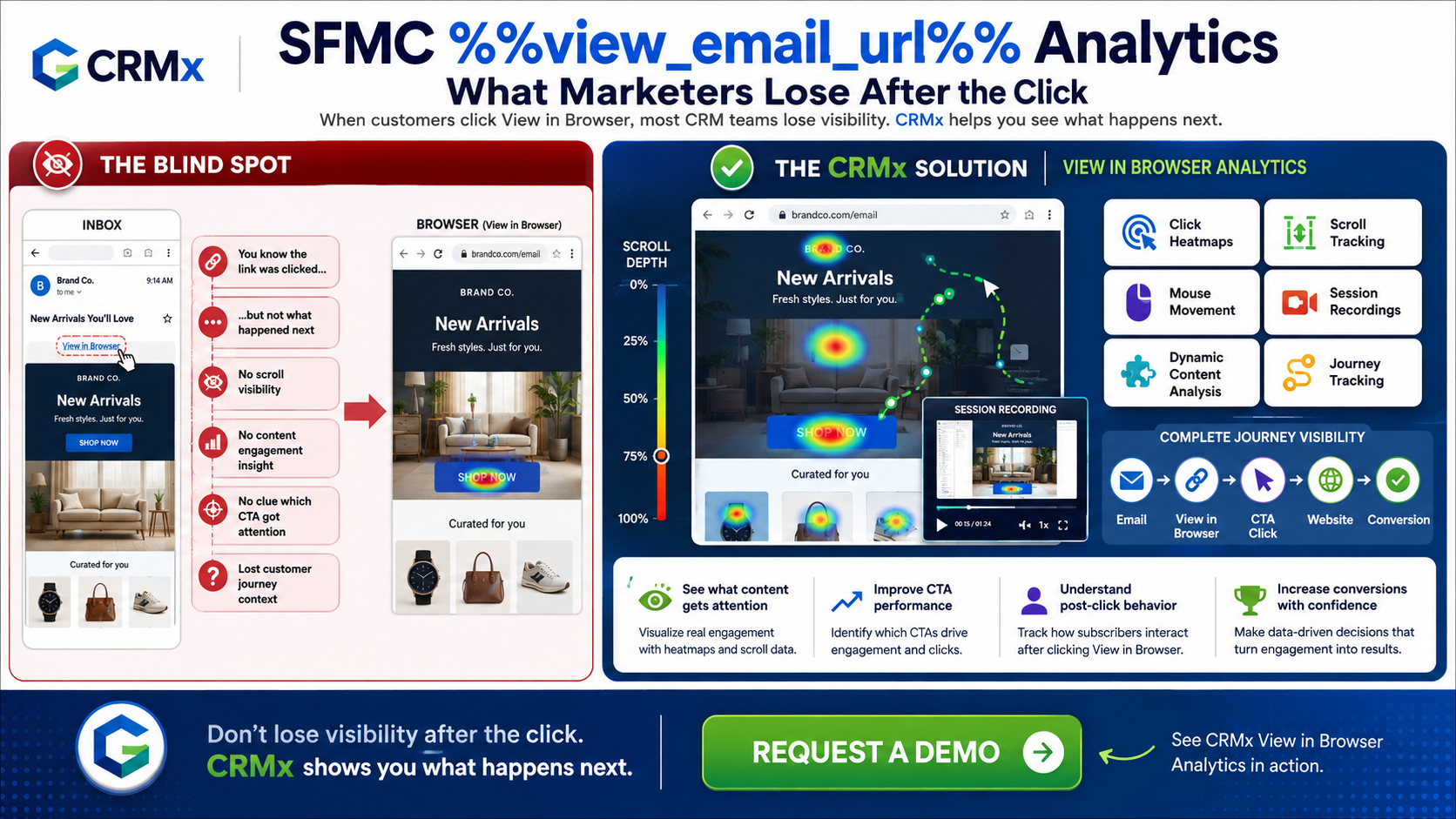

SFMC %%view_email_url%% Analytics: What Marketers Lose After the Click
Salesforce Marketing Cloud gives marketers detailed campaign reporting across deliveries, opens, clicks, bounces and unsubscribes. But there is an important point in the customer journey where visibility can become limited.
That point is the "%%view_email_url%%" link.
In Salesforce Marketing Cloud, "%%view_email_url%%" generates the View in Browser version of an email. It gives recipients another way to view the campaign outside their inbox.
For customers, this can improve accessibility and usability.
For marketers, however, it creates an important question:
What happens after the customer clicks View in Browser?
Knowing that someone clicked the link is useful. Understanding what they actually do inside the browser-rendered email is much more valuable.
The View in Browser Analytics Gap
Imagine your campaign contains a hero banner, personalised products, several promotional blocks and a primary CTA.
A recipient opens the email and clicks View in Browser.
The browser version loads.
The customer scrolls through the content, pauses over an offer, ignores one product section, clicks another CTA and continues to the website.
Traditional email reporting may tell you that the View in Browser link was clicked and that another campaign link generated a click.
But marketers still need answers to deeper behavioural questions.
• How far did the customer scroll?
• Which content received attention?
• Which CTA was clicked first?
• Which sections were ignored?
• Did the customer hesitate before clicking?
• What happened after the customer reached the website?
This is where behavioural analytics adds a new layer of campaign intelligence.
Why %%view_email_url%% Matters
The View in Browser experience should not be treated as a technical backup page.
For some recipients, it becomes the actual campaign experience.
Customers may use it because their inbox does not render the email correctly, images are blocked, the layout is difficult to read or they simply prefer viewing the content in a browser.
Once that happens, the customer has moved from an email environment into a browser environment.
That creates an opportunity to understand behaviour in greater detail.
What CRMx VIB Analytics Adds
CRMx View in Browser Analytics is designed to help close this visibility gap.
Instead of stopping the analysis when the recipient clicks View in Browser, CRMx helps marketing teams understand how customers interact with compatible browser-rendered email experiences.
Click Heatmaps
CRMx can visualise clicks directly over the View in Browser version of the campaign.
This helps teams identify which CTAs, images, navigation links and content areas generate engagement.
A traditional report may show that a campaign produced 2,000 clicks.
A heatmap helps explain where those clicks happened.
That visual context makes optimisation decisions easier.
Scroll Behaviour
A CTA cannot generate a click if customers never reach it.
Scroll analysis helps marketers understand how far users move through the browser-rendered email.
Suppose an important offer appears near the bottom of the campaign and receives very few clicks.
The initial conclusion may be that the offer is weak.
But if the scroll data shows that most visitors never reached that section, the real problem may be content placement rather than the offer itself.
That insight can completely change the next optimisation decision.
Mouse Movement
On supported browser experiences, mouse movement can provide additional behavioural context.
Marketers can investigate which areas attract interaction before a click takes place.
This can help reveal content that attracts attention but fails to generate action.
For example, customers may spend time around a product image but never click the CTA beneath it.
That may indicate an opportunity to improve the CTA wording, placement or visual hierarchy.
View in Browser Session Recordings
Heatmaps help identify patterns across multiple visitors.
Session recordings provide a closer view of individual behaviour.
CRMx VIB Session Recordings can help teams review supported browser sessions and observe how customers scroll, interact and move through the campaign.
This can reveal hesitation, repeated scrolling, ignored sections and the point where a customer leaves the experience.
Instead of only asking what happened, marketers can begin investigating why it happened.
Dynamic Content Makes This Even More Important
Many Salesforce Marketing Cloud campaigns use dynamic and personalised content.
Different customers may receive different images, products, offers, languages, messages and CTAs.
If engagement is analysed only at an aggregated campaign level, one strong-performing variation may hide another variation that is underperforming.
CRMx can support separate analysis of appropriately configured personalised email versions.
This gives CRM teams greater visibility into which customer experiences generate stronger engagement.
Connect View in Browser to the Website Journey
The View in Browser page is often only one stage of the journey.
A typical path may look like:
SFMC Email → View in Browser → CTA Click → Website → Product Page → Conversion
If marketing teams analyse every stage separately, important context can be lost.
A customer may interact strongly with the browser-rendered email but abandon after reaching the website.
In that case, the email may not be the problem.
Website heatmaps and session recordings can help investigate what happens next and identify possible conversion friction.
Move Beyond Opens and Clicks
Email campaign reporting is essential, but marketing optimisation increasingly requires more than top-level metrics.
CRM teams need to understand what customers actually experience.
Which content gets attention?
Which CTA creates action?
How far do customers scroll?
Which personalised version performs better?
What happens after the View in Browser click?
Where does the wider customer journey break down?
CRMx helps connect these behavioural questions with visual evidence.
Final Thoughts
"%%view_email_url%%" solves an important Salesforce Marketing Cloud requirement by allowing recipients to view an email in their browser.
But for marketers, the click should not represent the end of campaign analysis.
It should represent another measurable stage of the customer journey.
CRMx View in Browser Analytics helps teams understand browser-rendered email engagement through click heatmaps, scroll analysis, mouse movement, session recordings and connected website journey intelligence.
Instead of knowing only that someone clicked View in Browser, marketers can understand what happened next.
Stop losing visibility after the click. See the customer journey beyond the inbox.
"Request a personalised CRMx demo" (https://crmx.uk/request-demo)
"Explore CRMx Features & Benefits" (https://crmx.uk/features-benefits)