

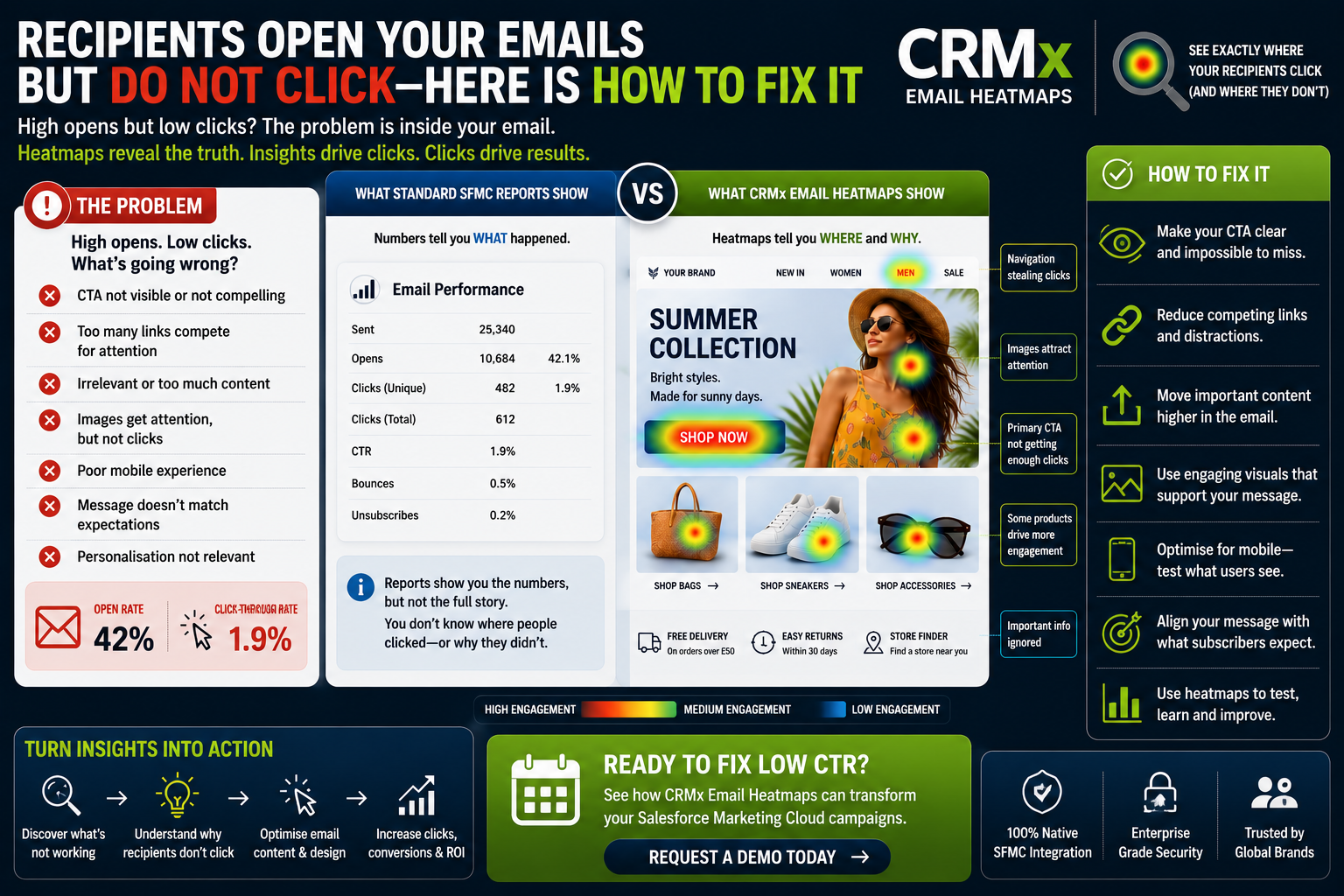

Recipients Open Your Emails but Do Not Click-Here Is How to Fix It
Your Salesforce Marketing Cloud campaign has an impressive open rate, yet hardly anyone clicks.
If you're seeing this pattern, you're not alone. It's one of the biggest frustrations for CRM and email marketing teams.
An open simply means your subject line persuaded someone to view the email. A click is what generates revenue, leads and conversions.
So why are recipients opening your emails but not taking action?
The answer usually isn't your subject line-it's what subscribers experience inside the email.
Why Opens Don't Always Lead to Clicks
Many marketers focus on increasing open rates because they're easy to measure.
However, a high open rate with a low click-through rate usually indicates problems with the email itself.
Common reasons include:
Your CTA isn't noticeable.
Too many links compete for attention.
The email is too long.
Images attract attention but not action.
The message doesn't match the subject line.
Mobile users struggle to find the CTA.
Personalised content isn't relevant.
Standard Salesforce Marketing Cloud reports highlight low CTR but don't explain what customers actually interacted with.
The Hidden Problem Inside Your Email
Imagine your report shows:
Open Rate: 43%
CTR: 1.9%
At first glance, the campaign looks disappointing.
But what actually happened?
Did subscribers:
Click the hero image?
Ignore the CTA?
Leave through the navigation menu?
Never scroll below the first section?
Prefer one product over another?
Traditional reports don't answer these questions.
CRMx Email Heatmaps do.
See Exactly What Customers Click
CRMx overlays click activity directly onto your Salesforce Marketing Cloud email.
Instead of analysing spreadsheets, you instantly see:
🔥 Which CTA received the most clicks
👀 Which images attracted attention
📉 Which content was ignored
① The first element customers clicked
⏱ How quickly subscribers engaged
📱 Mobile versus desktop behaviour
🌍 Dynamic email variation performance
This visual insight removes guesswork and helps marketing teams optimise emails based on real customer behaviour.
Five Ways to Increase Email Clicks
1. Make Your Primary CTA Impossible to Miss
Every email should have one clear action.
If subscribers have to search for your button, they'll often leave without clicking.
Move your CTA higher, increase contrast and simplify the message.
2. Remove Click Distractions
Navigation menus, social icons and multiple competing links reduce focus.
A cleaner email guides subscribers toward one goal.
Heatmaps quickly reveal which distractions steal attention.
3. Prioritise High-Performing Content
If customers consistently click one product image or offer, feature it more prominently in future campaigns.
Let customer behaviour shape your email layout.
4. Optimise for Mobile
Most emails are opened on smartphones.
Ensure important content and your CTA appear early without requiring excessive scrolling.
Compare mobile and desktop engagement to identify layout issues.
5. Learn From Every Campaign
Instead of simply recording CTR, review:
Which CTA performed best
Which content was ignored
What customers clicked first
Which personalised version generated the most engagement
How long it took customers to click
These insights help improve every future campaign.
Why CRM Teams Choose CRMx Email Heatmaps
CRMx extends Salesforce Marketing Cloud reporting with visual engagement intelligence.
Marketing teams can:
View clicks directly on email creatives
Identify high, medium and low engagement areas
Analyse CTA performance
Measure click order
Review time-to-click
Compare dynamic content
Analyse View in Browser engagement
Improve email conversions using behavioural data
Instead of wondering why subscribers didn't click, you'll know exactly where engagement stopped.
Turn Opens into Revenue
Open rates create opportunities.
Clicks create results.
If recipients consistently open your emails but fail to engage, your email design-not your audience-may be the real problem.
CRMx Email Heatmaps help Salesforce Marketing Cloud teams understand exactly how subscribers interact with every campaign, making it easier to improve engagement, increase click-through rates and generate more conversions.
Request a personalised CRMx demo today and discover why your subscribers open your emails-but don't click.