
Email Heatmaps vs Click Reports: What You’re Missing in SFMC
Salesforce Marketing Cloud (SFMC) gives you detailed click reports for every email campaign.
You can see:
• Total clicks
• Unique clicks
• Link-level performance
• Click-through rates
On the surface, this looks like everything you need.
But many campaign managers still struggle with the same question:
Why are our emails not improving consistently?
The answer lies in what click reports do not show.
This blog explains the difference between email heatmaps and click reports, and what you are missing if you rely on reports alone.
What Click Reports Tell You
Click reports provide structured data.
They show:
• Which links were clicked
• How many times they were clicked
• Basic engagement metrics
This helps you measure performance at a high level.
You can identify:
• Top-performing links
• Overall engagement trends
But click reports only answer one question:
“What was clicked?”
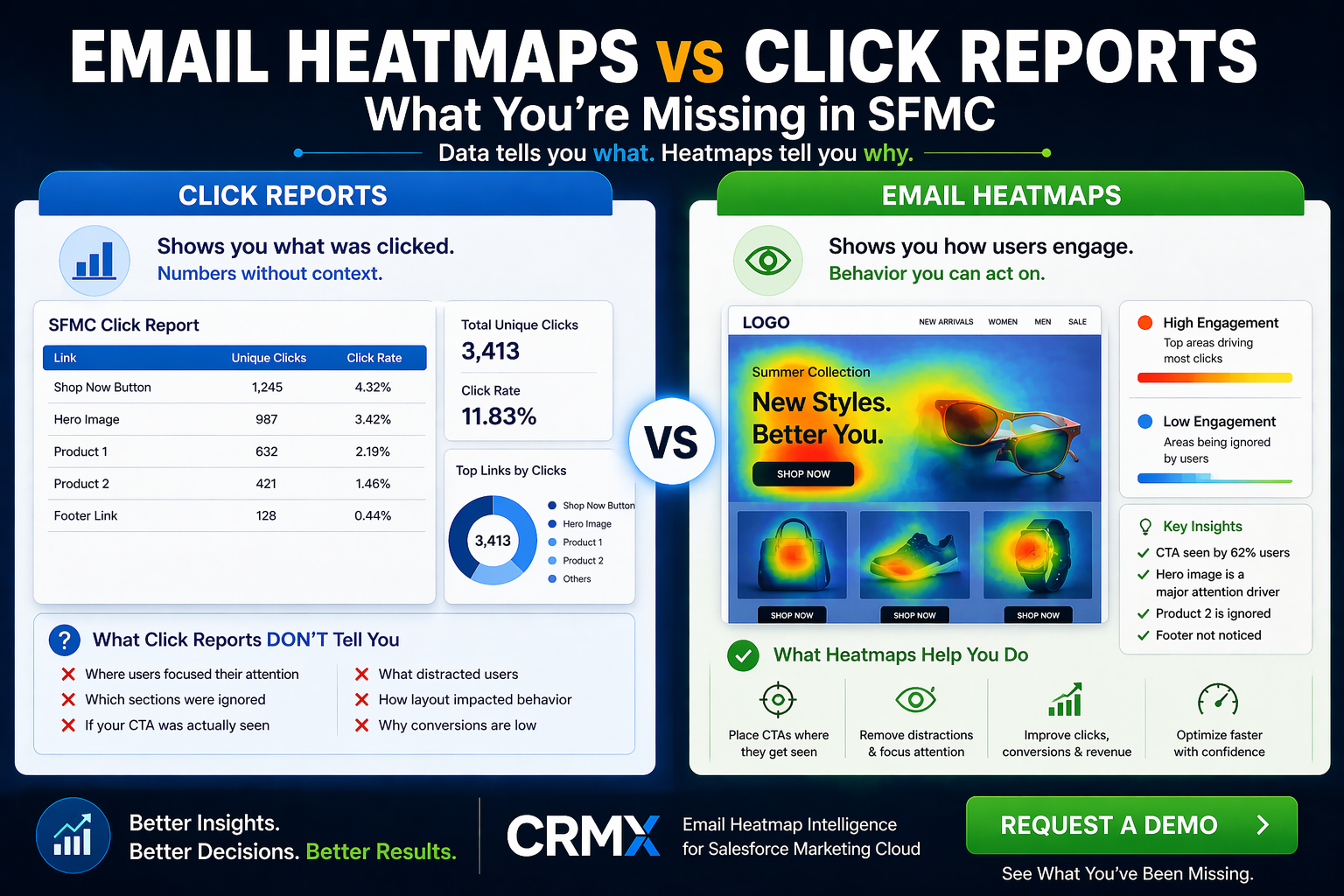
What Click Reports Do NOT Tell You
Click reports do not show:
• Where users focused their attention
• Which sections were ignored
• How layout influenced behaviour
• Whether CTAs were actually seen
• Why users clicked certain links
This creates a major gap.
You see results, but not behaviour.
Why This Gap Matters
Without behavioural insight:
• You cannot optimise placement effectively
• You cannot understand user intent
• You cannot identify distractions
• You cannot fix structural issues
This leads to:
• Repeated mistakes
• Slow optimisation
• Inconsistent performance
What Email Heatmaps Show
Email heatmaps provide a visual layer of engagement.
Instead of rows of data, you see your email with:
• Click hotspots (where users interact most)
• High-attention areas
• Dead zones (ignored sections)
• Engagement distribution across the layout
This answers a different question:
“How did users interact with the email?”
Click Reports vs Email Heatmaps: The Key Difference
Click Reports:
• Data-driven
• Link-level visibility
• Performance measurement
• Shows “what happened”
Email Heatmaps:
• Behaviour-driven
• Layout-level visibility
• Performance understanding
• Shows “why it happened”
Both are useful—but they serve different purposes.
Real Example of the Gap
Imagine this:
Your report shows:
• High clicks on an image
• Low clicks on your main CTA
Click report conclusion:
• The image is performing well
Heatmap insight:
• Users never saw the CTA
• The image distracted attention
• The CTA is placed in a low-visibility area
Without heatmaps, you optimise the wrong element.
With heatmaps, you fix the real problem.
When Click Reports Are Enough
Click reports are useful when:
• You need quick performance summaries
• You are comparing campaigns at a high level
• You are reporting basic metrics
But they are not enough for optimisation.
When You Need Email Heatmaps
You need heatmaps when:
• You want to improve conversions
• You want to understand user behaviour
• You want to optimise layouts
• You want faster decision-making
• You want to reduce guesswork
Heatmaps move you from reporting to optimisation.
How Campaign Teams Benefit From Using Both
The best approach is not replacing click reports.
It is combining them with heatmaps.
Click reports tell you:
• What happened
Heatmaps tell you:
• Why it happened
Together, they give you complete visibility.
How CRMX Bridges the Gap in SFMC
CRMX provides Salesforce Marketing Cloud Email Heatmap Intelligence designed to complement SFMC reporting.
With CRMX, you can:
• Visualise click behaviour directly on email layouts
• Identify high and low engagement areas instantly
• Detect distractions and dead zones
• Improve CTA placement
• Optimise campaigns faster and with confidence
CRMX turns click data into actionable insight.
Final Thoughts
Click reports are essential—but incomplete.
They tell you what users did.
But they don’t tell you why they did it.
And without understanding why, improvement becomes guesswork.
Salesforce Marketing Cloud gives you data.
CRMX gives you clarity.
If you want to move from reporting performance to improving performance, email heatmaps are the missing layer.
Still Relying Only on Click Reports?
Discover how Salesforce Marketing Cloud email heatmaps help you understand behaviour, optimise faster, and improve campaign results.
Request a demo to explore CRMX email heatmap intelligence.