Salesforce Marketing Cloud CloudPages play a critical role in modern CRM and lifecycle marketing. They are used for landing pages, preference centres, surveys, competitions, gated content, lead capture forms, and campaign destinations. Despite this importance, CloudPages suffer from a fundamental limitation: they do not provide behavioural analytics.
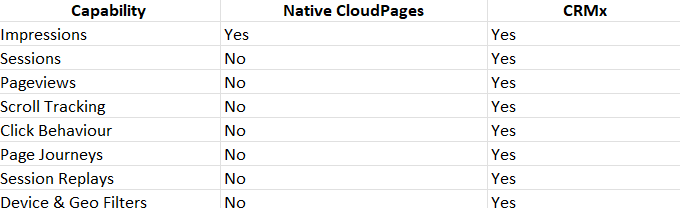
Natively, Salesforce Marketing Cloud CloudPages only track impressions. There is no concept of sessions, pageviews, bounce rates, scroll depth, or engagement journeys. Marketers know a page was loaded, but they don’t know what happened next.
This is where CRMx Session Recording Intelligence changes everything.
In this guide, we explain how CRMx records live user sessions on Salesforce Marketing Cloud CloudPages, what data is captured, how it works technically, and how marketers use these session recordings to improve conversions, user experience, and campaign performance.
Why Salesforce CloudPages Lack Behavioural Visibility
CloudPages were designed primarily as content and data capture surfaces, not as analytics tools. Their native tracking capabilities stop at impressions, which creates several challenges:
You cannot tell how long users stayed on a page
You cannot see if users scrolled or clicked
You cannot track user journeys across multiple CloudPages
You cannot diagnose why conversions fail
You cannot distinguish engaged users from accidental visits
Unlike traditional websites that rely on Google Analytics or similar platforms, CloudPages do not offer built-in session intelligence.
As a result, marketing teams often make decisions based on assumptions rather than evidence.
What Is Live Session Recording on CloudPages?
Live session recording captures real user interactions on CloudPages and converts them into video-style session replays.
Instead of static metrics, marketers can watch:
How users move their mouse or tap on mobile
Where users scroll and where they stop
Which elements attract attention
Where confusion or hesitation occurs
What happens immediately before a drop-off or conversion
Each session becomes a visual story, not just a number.
What Is CRMx Session Recording Intelligence?
CRMx Session Recording Intelligence is purpose-built to work seamlessly with Salesforce Marketing Cloud CloudPages.
CRMx does not replace Salesforce Marketing Cloud. Instead, it extends CloudPages with behavioural visibility, filling the analytics gap left by native tracking.
CRMx focuses specifically on:
CloudPages behaviour
Campaign-driven traffic
Conversion-focused journeys
CRM and lifecycle use cases
How CRMx Records Live User Sessions on CloudPages
CRMx records live user sessions through a lightweight tracking layer embedded into Salesforce Marketing Cloud CloudPages.
Step 1: CloudPages Instrumentation
CRMx injects a secure tracking script into CloudPages. This script is designed to:
Load asynchronously
Avoid performance impact
Respect privacy and compliance rules
The script activates only when a user visits the page.
Step 2: Session Initialization
When a visitor lands on a CloudPage:
A unique session is created
A session start timestamp is recorded
The visitor’s environment is captured
This includes:
Device type (desktop, mobile, tablet)
Browser
Operating system
Screen resolution
Unlike impressions, this session persists across user interactions and navigation.
Step 3: Behavioural Event Capture
Once the session is active, CRMx begins capturing behavioural events, including:
Mouse movements
Clicks and taps
Scroll depth and direction
Form interactions
Page navigation
These events are captured as time-based signals, allowing CRMx to reconstruct the session later as a replay.
Step 4: Page Journey Tracking Across CloudPages
If a visitor navigates between multiple CloudPages:
CRMx links those page views into a single session
Entry pages and exit pages are recorded
Page order is preserved
This allows marketers to see full CloudPages journeys, not isolated visits.
Step 5: Engagement Timing & Session Duration
CRMx records:
Entry time
Last engaged time
Total session duration
This enables analysis such as:
High-intent long sessions
Instant drop-offs
Sessions that stall without converting
Step 6: Geo, IP & Referrer Intelligence
CRMx enriches each session with contextual data:
Country and city
Referrer source (email, direct, external)
IP address (for QA, security, and internal traffic filtering)
This allows teams to:
Filter sessions by market
Validate campaign traffic
Exclude internal testing sessions
Step 7: Session Replay Generation
All captured events are stitched together into a video-style session replay.
Marketers can:
Play, pause, rewind
Speed up or slow down
Jump to specific interactions
No screen recording is required — the replay is reconstructed from interaction data.
What Marketers Can See in CRMx Session Recordings
CRMx transforms CloudPages analytics into a visual intelligence layer.
Marketers can see:
Live Session Videos
Watch exactly how users interacted with your CloudPages.
Page Visit Timeline
See which pages were visited and in what order.
Engagement Behaviour
Identify hesitation, confusion, or friction points.
Device-Specific UX Issues
Understand differences between desktop and mobile behaviour.
Conversion & Drop-Off Patterns
See what happens before a form submission or abandonment.
Why CRMx Session Recording Is Better Than Traditional Analytics
Traditional analytics tools answer what happened.
Session recordings answer why it happened.
Examples:
Analytics shows low conversion rate
Session recording shows users missing the CTA
Analytics shows high drop-off
Session recording shows a broken form field
This level of insight is not possible with impressions alone.
Common Use Cases for CRMx Session Recording on CloudPages
Campaign Landing Pages
Improve sign-up and lead capture rates.
Preference Centres
Identify usability issues that cause opt-outs.
Surveys & Competitions
Understand where users abandon multi-step flows.
Gated Content Pages
Optimise form placement and messaging.
QA & Debugging
Catch broken scripts and layout issues before revenue is impacted.
Privacy, Compliance & Performance
CRMx session recording is built with:
GDPR-conscious tracking
No sensitive field capture
Secure data handling
Minimal performance overhead
Session recording focuses on behavioural patterns, not personal data.
Why Session Recording Is Essential for CloudPages in 2026
CloudPages are increasingly used as conversion-critical assets. In 2026, relying on impressions alone is no longer acceptable.
Session recording enables:
Data-driven UX decisions
Faster campaign optimisation
Reduced conversion friction
Clear evidence for stakeholders
Final Thoughts
Salesforce Marketing Cloud CloudPages are powerful but analytics-limited by design. Native tracking stops at impressions, leaving marketers blind to real user behaviour.
CRMx changes this by recording live user sessions, capturing full CloudPages journeys, and turning behaviour into actionable visual insights.
In a world where every conversion matters, seeing how users behave is no longer optional - it’s essential.