
Optimise campaigns faster
Replace manual interpretation and assumptions with clear visual evidence of subscriber behaviour.

Visualise Salesforce Marketing Cloud email clicks, compare dynamic and personalised email versions from A/B to A–J, track View in Browser engagement, and connect CloudPage, website and session behaviour with CRMx.
CRMx is an email heatmap tool built for Salesforce Marketing Cloud optimisation, with View in Browser analytics for compatible Eloqua, Adobe Marketo Engage, Braze, HubSpot and other marketing platforms.
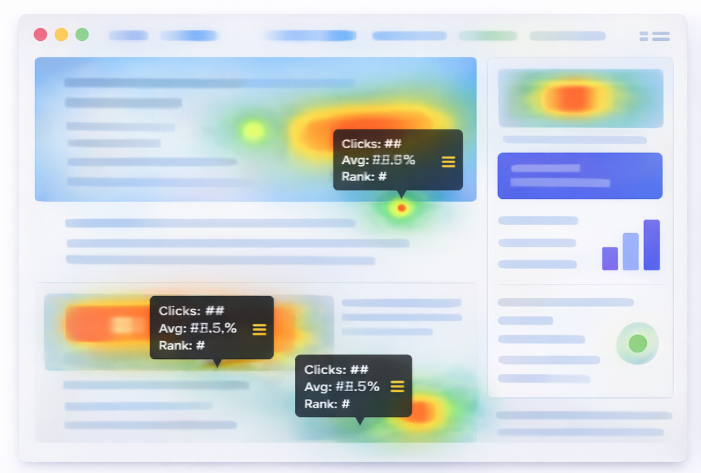
CRMx supports CRM, campaign, marketing automation, optimisation and technology teams that need clearer evidence of customer behaviour.




Standard reports show what happened. CRMx helps your teams understand why it happened, where customers engaged and how the experience can improve.
Replace manual interpretation and assumptions with clear visual evidence of subscriber behaviour.
Understand which placement, message, creative and personalised variation produces stronger engagement.
Continue understanding customer behaviour after the View in Browser link or landing-page click.
Give CRM teams, designers, stakeholders and leadership visual reports they can understand quickly.
Give campaign teams, designers and decision-makers one clear view of engagement across the complete customer experience.
| CRMx capability | What it does | Business benefit |
|---|---|---|
|
Email Heatmaps
|
Visualise subscriber clicks directly over the email design, including CTAs, images and content blocks. |
See which content attracts attention and which sections are being ignored.
|
|
Dynamic & Personalised Versions
|
Capture personalised versions of the same email separately by language, city, country, audience or content variation. |
Identify which personalised creative, message, image and CTA performs best.
|
|
A/B to A–J Comparison
|
Compare two to ten email versions with separate heatmaps, CTA results and click-performance reporting. |
Make complex dynamic-content and multivariate decisions easier and faster.
|
|
Email Click Intelligence
|
Analyse link engagement, click ranking, engagement strength, click order and time-to-click. |
Turn raw click data into clear campaign optimisation decisions.
|
|
CRMx VIB Suite
|
Capture reports, clicks, mouse movements and scroll behaviour on compatible View in Browser email pages. |
Close the analytics gap after recipients leave the original email.
|
|
Session Recordings
|
Replay visitor journeys across VIB pages, CloudPages, landing pages and websites. |
Identify hesitation, confusion, usability problems and conversion barriers.
|
|
Website & CloudPage Heatmaps
|
Capture page clicks, mouse movement and scroll depth across supported pages and domains. |
Understand engagement hotspots, ignored content and post-click friction.
|
|
End-to-End Journey Intelligence
|
Connect email engagement, VIB activity, website visits, heatmaps and session behaviour. |
Understand the customer experience beyond the initial campaign click.
|
Visualise subscriber clicks directly over the email design, including CTAs, images and content blocks.
Capture personalised versions of the same email separately by language, city, country, audience or content variation.
Compare two to ten email versions with separate heatmaps, CTA results and click-performance reporting.
Analyse link engagement, click ranking, engagement strength, click order and time-to-click.
Capture reports, clicks, mouse movements and scroll behaviour on compatible View in Browser email pages.
Replay visitor journeys across VIB pages, CloudPages, landing pages and websites.
Capture page clicks, mouse movement and scroll depth across supported pages and domains.
Connect email engagement, VIB activity, website visits, heatmaps and session behaviour.
When recipients select View in Browser, normal email analytics may provide limited visibility into what happens next. CRMx VIB Suite helps connect browser-rendered email engagement with the wider post-click customer journey.
CRMx is configured around your platform, campaign architecture, personalised content, View in Browser experience and website journey.
We review your platform, campaign types, dynamic-content structure, VIB process, website journey and reporting requirements.
CRMx configures the required platform connection, campaign data, approved domains, tracking scripts and access permissions.
Standard and personalised email versions are captured using agreed identifiers such as language, city, audience or content variation.
CRMx captures compatible VIB, CloudPage and website interaction according to the selected implementation scope.
Teams review click behaviour, movement, scroll depth, CTA performance and session recordings across the journey.
Use A/B or A–J comparisons, visual reports and customer-behaviour evidence to improve future campaigns.
CRMx onboarding is scoped around your organisational requirements, marketing platform, approved domains, access model, privacy controls and technical governance.
Security, privacy, consent, data retention and implementation requirements are agreed with the client during onboarding.
Client users can receive access only to the platform areas and reports relevant to their responsibilities.
Domains, tracking implementation and administrative access can be controlled through the agreed onboarding process.
Sensitive fields, elements and pages can be excluded or masked according to the selected configuration.
Connections and data flows are configured around the client’s platform architecture and selected CRMx services.
Campaign, VIB and website tracking changes are reviewed and tested before production activation.
CRMx provides agreed onboarding, technical guidance, issue investigation and platform support.
CRMx capabilities vary by platform and implementation. CRMx VIB Suite can be configured for compatible View in Browser experiences across leading marketing automation platforms.
Understand how CRMx integrates, captures customer behaviour, supports personalised campaigns and fits into your existing environment.
CRMx is a customer-experience intelligence platform that helps marketing teams understand engagement across emails, personalised versions, View in Browser pages, CloudPages, landing pages and websites. It provides visual heatmaps, click intelligence, comparisons, session recordings and journey reporting.
CRMx email heatmap capabilities are designed around supported campaign integrations such as Salesforce Marketing Cloud. CRMx VIB Suite can also be configured for compatible View in Browser experiences from Salesforce Marketing Cloud, Oracle Eloqua, Adobe Marketo Engage, Braze, HubSpot and other marketing platforms. Exact compatibility is confirmed during discovery.
Yes. When the required identifiers and content information are available, CRMx can capture personalised versions separately. Variations may be distinguished by language, city, country, audience, image, CTA, content alias or another agreed identifier.
Yes. CRMx supports a standard A/B comparison and can extend to as many as ten versions, A–J. Each version can retain its own heatmap, click-performance report and CTA engagement results.
CRMx VIB Suite is designed for compatible View in Browser email experiences. It can provide VIB reports, click heatmaps, mouse-movement heatmaps, scroll analysis, A/B heatmap comparison and session recordings.
CRMx can connect email engagement, View in Browser activity and subsequent website behaviour when the required links, identifiers, approved domains and tracking implementation are configured.
CRMx operates as an analytics and customer-experience intelligence layer rather than an email-delivery platform. Any campaign, link or template changes required for the selected capability are reviewed and tested before production implementation.
CRMx implementations should be configured to avoid capturing passwords, payment-card information and unnecessary sensitive data. Sensitive fields, pages and elements can be excluded or masked according to the agreed implementation and client privacy requirements.
Implementation time depends on the selected services, platform access, Business Unit or domain structure, dynamic-content complexity, VIB setup, website deployment, security review and testing requirements. A scoped onboarding plan and timeline are agreed before implementation.
CRMx does not normally provide a self-service free trial because the services require secure client-specific configuration, implementation and testing. Prospective clients can request a personalised demonstration and receive a scoped solution proposal.
Request a personalised demonstration covering your marketing platform, dynamic-content use cases, View in Browser journey, website tracking and reporting requirements.
Request a Personalised DemoClient-specific scope, technical requirements and implementation timelines are confirmed following discovery.